Delta Troubleshooting & FAQ Hub
Get straightforward answers regarding task scheduling configurations, system parameters, execution logs, and official installation guidelines to keep your workflows running smoothly.
Navigating the Task Processing Interface
Understanding how primary tabs structure your automation schedules and execution telemetry.
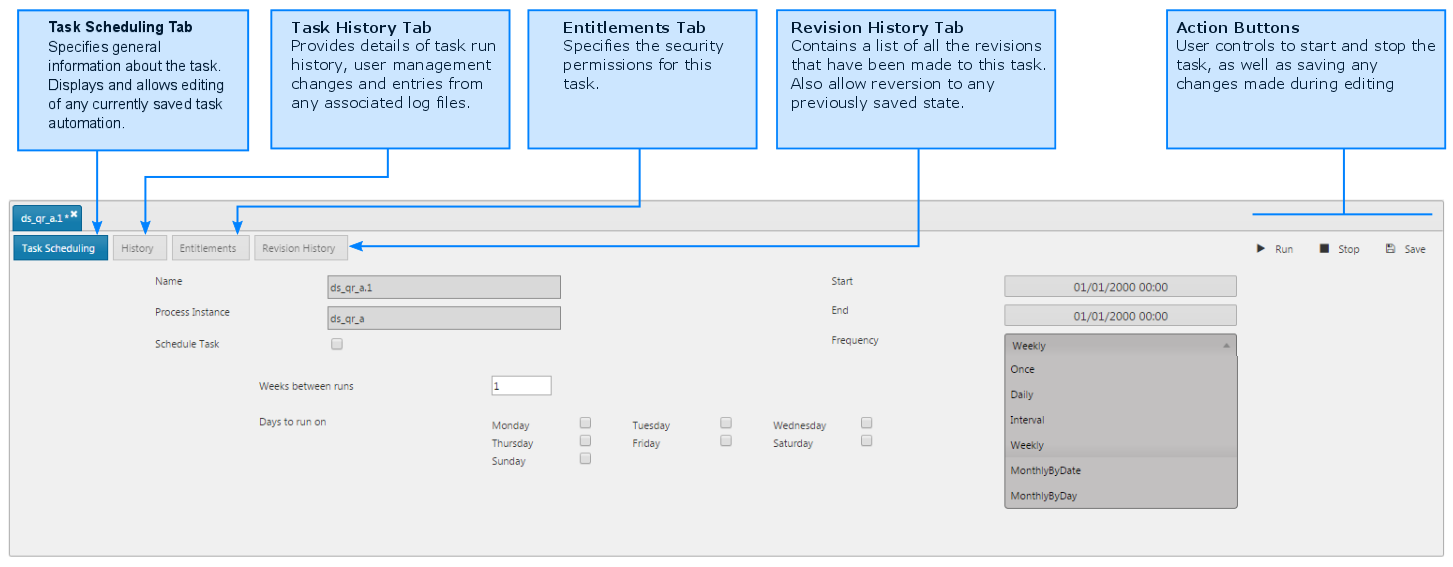
Task Scheduling Tab
Specifies general information about the task, displaying and allowing edits for currently saved automation parameters.
Task History Tab
Provides details of task run history, user management updates, and entries from associated log files.
Action Controls
Immediate user controls to run, stop, or save any parameter changes made during configuration.
Frequently Asked Questions
Clear, direct solutions to help you resolve operational hurdles quickly.
Where can I securely obtain the Delta Official Download?
How do I modify task frequencies after creation?
Can I view historical execution logs in Delta?
Managing Tasks via Context Menus
Streamline daily operations using quick task commands and revision tracking.
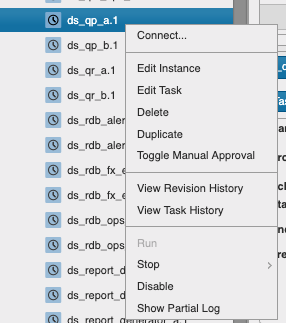
Quick Context Access
Right-click any task in your workspace to instantly open the management menu for direct connectivity and instance modifications.
Revision Tracking
Easily view revision histories and task execution logs to audit past changes and maintain high automation reliability.